Showing posts with label Different types of Operating system. Show all posts
Tuesday, 12 February 2019
Interactive OS
Interactivity refers to the ability of users to interact with a computer system. An
Operating system does the following activities related to interactivity:
Provides the user an interface to interact with the system.
Manages input devices to take inputs from the user. For example, keyboard.
Manages output devices to show outputs to the user. For example, Monitor.
The response time of the OS needs to be short, since the user submits the
request and waits for the result.
Operating system does the following activities related to interactivity:
Provides the user an interface to interact with the system.
Manages input devices to take inputs from the user. For example, keyboard.
Manages output devices to show outputs to the user. For example, Monitor.
The response time of the OS needs to be short, since the user submits the
request and waits for the result.
Network OS
Network operating system is an operating system that provides features such as file
sharing across the network and that includes the communication scheme that allows different processes on different computers to exchange messages.
Example: Microsoft Windows Server 2003, Microsoft Windows Server 2008, UNIX,
Linux, Mac OS X, Novell NetWare, and BSD.
sharing across the network and that includes the communication scheme that allows different processes on different computers to exchange messages.
Example: Microsoft Windows Server 2003, Microsoft Windows Server 2008, UNIX,
Linux, Mac OS X, Novell NetWare, and BSD.
Distributed OS or Distributed Systems (also called loosely coupled systems)
Distributed system is a collection of physically separate, possibly heterogeneous,
computer systems that are networked to provide the users with access to the various
resources that the system maintains. Access to a shared resource increases computation
speed, functionality, data availability, and reliability.
In contrast to the tightly coupled systems, the processors in Distributed Systems do not
share memory or a clock. Instead, each processor has its own local memory and clock.
The processors communicate with one another through various communication lines,
such as high-speed buses or telephone lines within Local Area Network (LAN) or
Metropolitan Area Network (MAN) or Wide Area Network (WAN). These systems are
usually referred to as loosely coupled systems, or distributed systems.
The processors in a distributed system may vary in size and function. They may include
small microprocessors, workstations, minicomputers, and large general-purpose
computer systems. These processors are referred to by a number of different names,
such as sites, nodes, computers, and so on.
Advantages:
• Resource sharing. A user at one site may be able to use the resources available at
another site. For example, a user at site A may be using a laser printer available only at
site B. Meanwhile, a user at B may access a file that resides at A.
• Computation speedup. If a particular computation can be partitioned into a number
of sub computations that can run concurrently, then a distributed system may allow us
to distribute the computation among the various sites — to run that computation
concurrently. In addition, if a particular site is currently overloaded with jobs, some of
them may be moved to other, lightly loaded, sites. This movement of jobs is called load
sharing.
• Reliability. If one site fails in a distributed system, the remaining sites can potentially
continue operating.
• Communication. When many sites are connected to one another by a communication
network, the processes at different sites have the opportunity to exchange information.
Users may initiate file transfers or communicate with one another via electronic mail. A
user can send mail to another user at the same site or at a different site.
computer systems that are networked to provide the users with access to the various
resources that the system maintains. Access to a shared resource increases computation
speed, functionality, data availability, and reliability.
In contrast to the tightly coupled systems, the processors in Distributed Systems do not
share memory or a clock. Instead, each processor has its own local memory and clock.
The processors communicate with one another through various communication lines,
such as high-speed buses or telephone lines within Local Area Network (LAN) or
Metropolitan Area Network (MAN) or Wide Area Network (WAN). These systems are
usually referred to as loosely coupled systems, or distributed systems.
The processors in a distributed system may vary in size and function. They may include
small microprocessors, workstations, minicomputers, and large general-purpose
computer systems. These processors are referred to by a number of different names,
such as sites, nodes, computers, and so on.
Advantages:
• Resource sharing. A user at one site may be able to use the resources available at
another site. For example, a user at site A may be using a laser printer available only at
site B. Meanwhile, a user at B may access a file that resides at A.
• Computation speedup. If a particular computation can be partitioned into a number
of sub computations that can run concurrently, then a distributed system may allow us
to distribute the computation among the various sites — to run that computation
concurrently. In addition, if a particular site is currently overloaded with jobs, some of
them may be moved to other, lightly loaded, sites. This movement of jobs is called load
sharing.
• Reliability. If one site fails in a distributed system, the remaining sites can potentially
continue operating.
• Communication. When many sites are connected to one another by a communication
network, the processes at different sites have the opportunity to exchange information.
Users may initiate file transfers or communicate with one another via electronic mail. A
user can send mail to another user at the same site or at a different site.
Monday, 11 February 2019
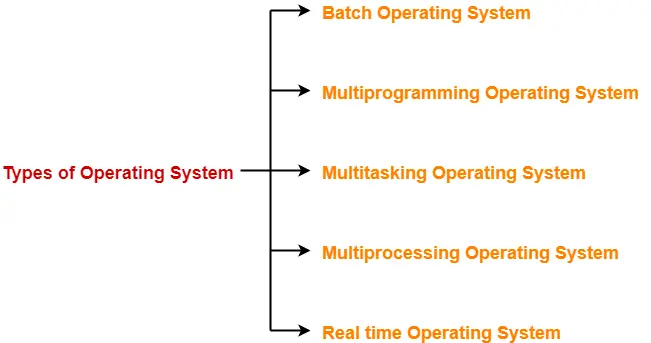
Different types of Operating system
multiprocessor operating systems
operating systems
Parallel system
Multiprocessor systems or Parallel Systems (also called tightly coupled systems)
Multiprocessor Operating System refers to the use of two or more central processing
units (CPU) within a single computer system. These multiple CPUs are in a close
communication sharing the computer bus, memory and other peripheral devices.
Multiprocessor systems are also called as parallel systems or tightly coupled systems.
These types of systems are used when very high speed is required to process a large
volume of data. These systems are generally used in environment like satellite control,
weather forecasting etc.
Advantages:
Increased Throughput: By increasing the number of processors, we expect to get more
work done in less time.
Economy of scale: Multiprocessor systems can cost less than equivalent multiple single-
processor systems, because they can share peripherals, mass storage, and power
supplies.
Increased reliability: As there are multiple processors in the system, failure of one
processor will not halt the system, only slow it down. This ability to continue providing
services proportional to the level of surviving hardware is called as graceful
degradation.
Disadvantages:
Multiprocessing can cause a system to change its memory access model from uniform
memory access (UMA) to non-uniform memory access (NUMA). NUMA is a kind of
situation in which some parts of memory may take longer to access than other parts
creating a performance penalty.
Types of multiprocessor systems:
There are two types: multiprocessor systems using asymmetric multiprocessing (ASMP)
and multiprocessor systems using symmetric multiprocessing (SMP).
In ASMP each processor is assigned a specific task. There is one master processor which
controls the system and the other processors are the slave processors. The master
processor allocates and schedules the work to the slave processors. Slave processors
perform the task given to them by master processor.
In SMP no master-slave relationship exists between processors. Each processor has its
own set of registers as well as local cache. All the processors share the same physical
memory and all of them run an identical copy of operating system
units (CPU) within a single computer system. These multiple CPUs are in a close
communication sharing the computer bus, memory and other peripheral devices.
Multiprocessor systems are also called as parallel systems or tightly coupled systems.
These types of systems are used when very high speed is required to process a large
volume of data. These systems are generally used in environment like satellite control,
weather forecasting etc.
Advantages:
Increased Throughput: By increasing the number of processors, we expect to get more
work done in less time.
Economy of scale: Multiprocessor systems can cost less than equivalent multiple single-
processor systems, because they can share peripherals, mass storage, and power
supplies.
Increased reliability: As there are multiple processors in the system, failure of one
processor will not halt the system, only slow it down. This ability to continue providing
services proportional to the level of surviving hardware is called as graceful
degradation.
Disadvantages:
Multiprocessing can cause a system to change its memory access model from uniform
memory access (UMA) to non-uniform memory access (NUMA). NUMA is a kind of
situation in which some parts of memory may take longer to access than other parts
creating a performance penalty.
Types of multiprocessor systems:
There are two types: multiprocessor systems using asymmetric multiprocessing (ASMP)
and multiprocessor systems using symmetric multiprocessing (SMP).
In ASMP each processor is assigned a specific task. There is one master processor which
controls the system and the other processors are the slave processors. The master
processor allocates and schedules the work to the slave processors. Slave processors
perform the task given to them by master processor.
In SMP no master-slave relationship exists between processors. Each processor has its
own set of registers as well as local cache. All the processors share the same physical
memory and all of them run an identical copy of operating system
Real-Time OS or Real-Time Embedded System
A system is said to be Real Time if it is required to complete its work & deliver
its services on time.
Real time systems are used in an environment where a large number of events
(generally external) must be accepted and processed in a short time.
Example – Flight Control System
All tasks in that system must execute on time.
Types of Real Time OS
Hard Real Time System
Failure to meet deadlines is fatal
Example: Flight Control System, Industrial control systems
Soft Real Time System
Late completion of jobs is undesirable but not fatal.
System performance degrades as more & more jobs miss deadlines
Example: Online Databases, Online Reservation System.
its services on time.
Real time systems are used in an environment where a large number of events
(generally external) must be accepted and processed in a short time.
Example – Flight Control System
All tasks in that system must execute on time.
Types of Real Time OS
Hard Real Time System
Failure to meet deadlines is fatal
Example: Flight Control System, Industrial control systems
Soft Real Time System
Late completion of jobs is undesirable but not fatal.
System performance degrades as more & more jobs miss deadlines
Example: Online Databases, Online Reservation System.
Time-sharing OS or Multitasking Systems
Time-sharing is a technique which enables many people, located at various terminals, to
use a particular computer system at the same time. Time-sharing or multitasking is a
logical extension of multiprogramming. Processor's time is shared among multiple
users simultaneously. The operating system uses CPU scheduling and
multiprogramming to provide each user with a small portion of a time. Multiple jobs
are executed by the CPU by switching between them, but the switches occur so
frequently that user can interact with each program while it is running.
Advantages of Timesharing operating systems are as follows:
Provides quick response i.e. short response time.
Avoids duplication of software
Reduces CPU idle time
use a particular computer system at the same time. Time-sharing or multitasking is a
logical extension of multiprogramming. Processor's time is shared among multiple
users simultaneously. The operating system uses CPU scheduling and
multiprogramming to provide each user with a small portion of a time. Multiple jobs
are executed by the CPU by switching between them, but the switches occur so
frequently that user can interact with each program while it is running.
Advantages of Timesharing operating systems are as follows:
Provides quick response i.e. short response time.
Avoids duplication of software
Reduces CPU idle time
Multiprogrammed Batch OS or Multiprogrammed Systems:
A single user cannot, in general, keep either the CPU or the I/O devices busy at all
times. Multiprogramming increases CPU utilization by organizing jobs such that the
CPU always has one to execute.
An OS does the following activities related to multiprogramming.
The operating system keeps several jobs in memory at a time.
This set of jobs is a subset of the jobs kept in the job pool.
The operating system picks and begins to execute one of the jobs in the memory.
When the executing job J1 needs to wait (for I/O or event completion), the
operating system simply switches to and start executing another job say J2. When
job J2 needs to wait, the CPU is switched to another job say J3, and so on.
Once the first job J1 finished its I/O or event wait, it joins the ready queue and
waits for a CPU.
Eventually, the first job J1 finishes waiting and gets the CPU back.
As long as there is always some job ready to execute, the CPU will never be idle.
Advantages: High CPU Utilization.
Disadvantages: CPU Scheduling, Main Memory Management is required.
times. Multiprogramming increases CPU utilization by organizing jobs such that the
CPU always has one to execute.
An OS does the following activities related to multiprogramming.
The operating system keeps several jobs in memory at a time.
This set of jobs is a subset of the jobs kept in the job pool.
The operating system picks and begins to execute one of the jobs in the memory.
When the executing job J1 needs to wait (for I/O or event completion), the
operating system simply switches to and start executing another job say J2. When
job J2 needs to wait, the CPU is switched to another job say J3, and so on.
Once the first job J1 finished its I/O or event wait, it joins the ready queue and
waits for a CPU.
Eventually, the first job J1 finishes waiting and gets the CPU back.
As long as there is always some job ready to execute, the CPU will never be idle.
Advantages: High CPU Utilization.
Disadvantages: CPU Scheduling, Main Memory Management is required.
Subscribe to:
Posts
(
Atom
)
